


Family Dollar
3.714.66K Reviews
App Specs
- Version
- 8.3.0
- Updated On
- License
- Free
- Downloads
- 10,000,000+
- Developer
- Family Dollar Stores
- Categories
- Shopping
- Platform
- Android, iOS
Screenshots
 Analysis by AppCompare
I find the most useful way to approach the Family Dollar app is as a planning companion for a particular store trip, not as a replacement for browsing the aisles. It can help me organize what I want to check, locate a nearby branch, and keep digital coupons in view. That makes it most appealing when Family Dollar is already part of your routine; it is less compelling if you expect one app to compare every retailer’s prices or handle every step of a purchase.
That distinction matters because a useful shopping app is only as good as the habits around it. I get more from checking an offer before I leave, making a short list, and then confirming details in the store than from opening the app at random and hoping a discount appears. Used as a small planning tool rather than a promise of automatic savings, it has a sensible place in a value-focused shopping routine.
A repeatable routine beats aimless browsing
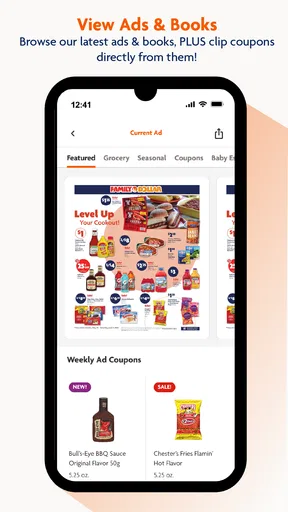
Before a trip, I would start with the weekly ad and the coupon area, then make a list of the items I actually intend to buy. This order helps separate a real saving from an appealing offer on something I did not need. A coupon is useful when it fits the household list; it is not a reason by itself to add another item to the basket.
For a realistic example, imagine I am stopping for a few pantry basics and cleaning supplies after work. I can check the ad while deciding which store to visit, save relevant coupons, and make a concise list before leaving. In the aisle, I can use the scanner when I want to check an item’s price, rather than relying on memory or assuming the shelf label matches what I expected. The payoff is less second-guessing, not a guarantee that every trip will be cheaper.
I would keep the list practical and grouped in the order I expect to shop, even if the app does not arrange it that way for me. A short list is easier to scan on a phone than a running record of every household item. For shared errands, I would also decide in advance who is responsible for checking the coupons and list; that avoids two people independently collecting offers or buying duplicates.
Small checks that prevent checkout surprises
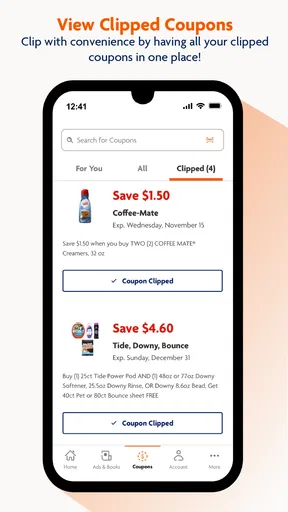
Digital coupons remove the need to carry paper, but I would still review the offers I intend to use before reaching the register. Check the wording and the items it applies to, and make sure the coupon has been added to the account as intended. That quick pause is more dependable than assuming every promotion in the app will apply to every similar-looking product.
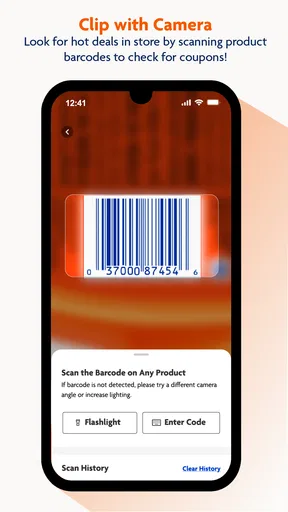
Price scanning is most valuable as a verification step. If a shelf price seems unclear or I am comparing sizes, scanning can help me make a more informed choice while I am still near the product. I would not treat a scan as a substitute for checking the displayed offer or asking store staff about a discrepancy, especially when a promotion has conditions.
Worth Reading Before You Choose

EA SPORTS FC Mobile 26 Is a Bigger Football Game, but It Takes Time

Flipboard Shows What News Apps Must Do Beyond the Feed

Switching to Android Auto Means Rethinking Your Driving Routine

Google Calendar Makes a Crowded Week Easier to Manage

Ludo King Makes the Most of the Minutes Between Plans

Baby Panda World Brings Quick Play to Modern Phones, but Its Game Library Feels Busy
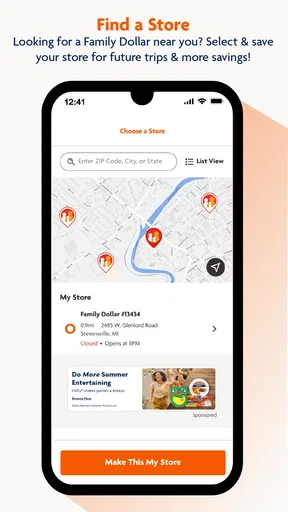
The store locator is another feature I would use before setting out, particularly when I am visiting an unfamiliar area. Confirming the branch first is a simple way to avoid driving to the wrong place. When location access is involved, I would use the locator when needed and make whatever location choice feels appropriate in the device settings; the key practical point is that directions are useful only if the app can identify the store you want.
Where it fits among shopping alternatives
Compared with a paper flyer and handwritten list, the app brings ads, coupons, store finding, lists, and scanning into one place. That is convenient if I already shop at Family Dollar and want fewer scraps of paper. A general notes app can be better for a household list that needs to work across many stores, while a retailer-neutral comparison tool is a better fit when the main goal is to find the lowest price across different chains.
I would not use Family Dollar’s app as my only source for deciding where to shop. Its value is naturally tied to this retailer, so a basket that spans several stores may still need a separate comparison or planning method. Likewise, someone who prefers to choose products entirely in person may get little from checking digital offers beforehand, though the scanner and locator can still help with specific questions during a visit.
The strongest use case is a shopper who makes regular, relatively focused trips and appreciates having the store’s planning tools together. It is also a reasonable choice for someone who wants to check the weekly ad before deciding whether a stop is worthwhile. If you rarely visit Family Dollar, dislike managing coupons, or need a complete cross-store shopping system, I would keep it optional rather than building your whole routine around it.
Getting Started with the Family Dollar App
First things first, downloading the Family Dollar app was a breeze. Available for both Android and iOS, it’s just a quick visit to your app store, and bam, you’re ready to roll. Once you open it up, you’re greeted with a clean and intuitive interface. No need to go digging through endless menus to find what you need. It’s all right there, front and center.
Signing up is straightforward, too. Just pop in your email, create a password, and you’re good to go. The app doesn’t bombard you with unnecessary questions, which is always a plus in my book. Once you're signed in, the real fun begins.
Exploring Deals and Coupons
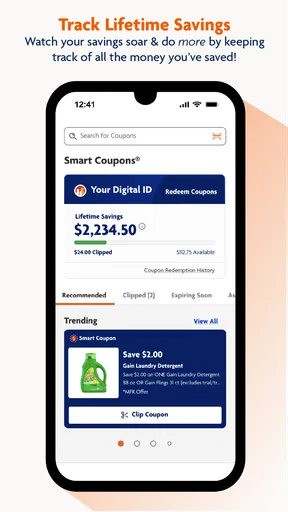
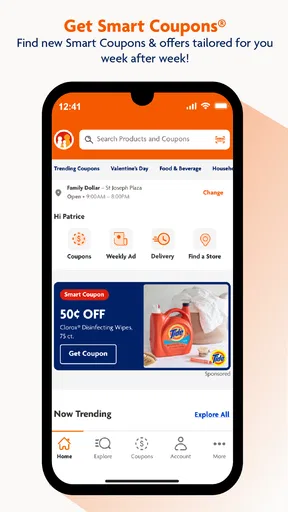
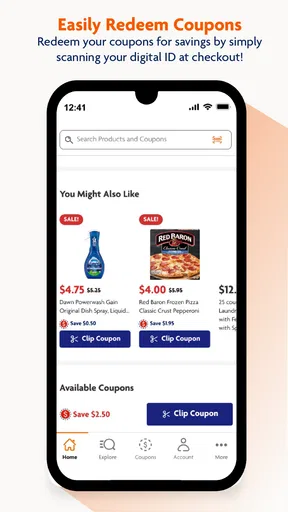
Now, this is where the magic happens. The app is loaded with exclusive deals and coupons that you can’t find anywhere else. Whether it’s discounts on groceries, household items, or seasonal products, there’s something for everyone. The best part? You can clip these coupons digitally, so there’s no need for paper clutter. Just add them to your account, and they’re ready to use at checkout.
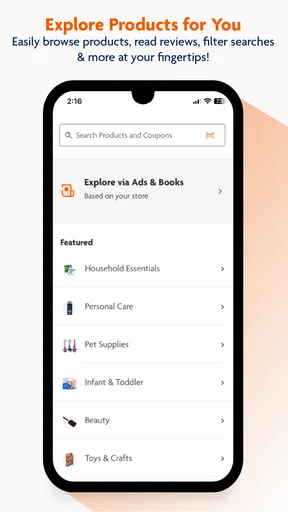
I found the deal categories super handy. You can browse by department, which is great if you’re looking for something specific. Plus, the app updates regularly with new offers, so it’s worth checking back often. Trust me, nothing beats the satisfaction of saving a few bucks on your favorite items.
User-Friendly Navigation
As someone who isn’t always the most tech-savvy, I appreciate how easy the app is to navigate. The main menu is straightforward, with options like “Weekly Ads,” “Coupons,” and “Store Locator.” Everything is just a tap away, so you don’t waste time hunting for what you need.
Speaking of the store locator, this feature is a lifesaver. If you’re out and about and need to find the nearest Family Dollar store, the app has you covered. It uses your location to pinpoint the closest options, complete with directions. It’s like having a personal shopping assistant right on your phone.
Shopping Lists and More
One of my favorite features has to be the shopping list tool. You can create and manage lists directly in the app, making it easy to keep track of what you need. And if you’re like me and tend to forget that one crucial item, this feature is a godsend.
Another neat aspect is the product scanner. While browsing in-store, you can scan items to check prices, which adds a layer of convenience to your shopping experience. No more guessing games or sticker shock at the register!
Additional Features
The app doesn’t stop there. It also offers features like weekly ads, which let you stay on top of all the latest promotions. You can view these ads right from your phone, ensuring you never miss out on a deal. Plus, the app occasionally offers sneak peeks at upcoming sales, so you can plan your shopping trips accordingly.
If you’re someone who loves to stay organized, the app’s calendar feature might be right up your alley. It lets you sync your shopping lists and coupons with your device’s calendar, setting reminders for when deals expire. It’s all about making your life easier and your shopping trips more efficient.
Final Thoughts
All in all, the Family Dollar app is a solid addition to any savvy shopper’s arsenal. It’s user-friendly, packed with features, and most importantly, it helps you save money. Whether you’re a frequent Family Dollar shopper or just looking for some sweet deals, this app delivers.
So, if you haven’t already, give it a whirl and see how it fits into your shopping routine. Who knows, it might just become your go-to for all things deals and discounts. Happy shopping!
What to expect from the app over time
Family Dollar Stores is the developer, and the app is free, which makes it easy to try without committing money to a shopping tool. It has an average rating of 3.7 from around 40,000 ratings, alongside about 14,000 written reviews, and has been installed over 10 million times. I read that as evidence of a familiar, widely used retailer app, not a guarantee that every feature will suit every phone or shopping style.
The current version is 8.2.1, and it runs on Android 7.0 or later. Its content rating is Everyone, so it is presented for a broad audience. The app first appeared on June 5, 2017, and its ongoing revisions are framed around improving the experience. In practical terms, I would keep it updated through the usual app-store process, especially if a tool stops behaving as expected after a device change.
One question shoppers often have is whether they need an account to get value from it. The app’s coupon workflow is tied to signing in, so anyone who wants to clip offers should be ready to create and use an account. If you only want to check information before a trip, the experience may differ from using account-linked tools; I would decide which features matter to me first rather than signing up just because the app asks.
Settings and habits worth checking
I would keep notifications purposeful instead of allowing every prompt to interrupt the day. If alerts are available in the device or app settings, choose only the ones that help you act, such as reminders you genuinely want, and silence the rest. The point is not to chase every promotion; it is to make the app serve a planned errand without turning shopping into a stream of nudges.
For repeat trips, a simple habit works better than trying to remember every screen: check the ad, clip only relevant coupons, review the list, and then use the locator or scanner as needed. I would also clear or revise an old list after shopping so it stays useful rather than becoming a record of things already bought. That small bit of maintenance is easy to overlook, but it prevents a convenient list from becoming clutter.
Calendar reminders can help when I have a specific offer or errand to remember, but I would be selective about syncing. A calendar is already crowded for many people, and adding every shopping item can make important appointments harder to notice. I would use reminders for a meaningful deadline, not as a substitute for checking the current offer before shopping.
When the convenience has a limit
Retail promotions can come with product or timing conditions, and a digital coupon does not remove the need to read them. The app can organize an offer, but it cannot decide whether the item is the right size, brand, or value for my household. I still compare the actual product and total cost, especially when buying something unfamiliar just because it appears in a deal section.
There is also a difference between convenience and certainty. A price check on a phone helps me ask a better question, but if the shelf, scan, or register do not agree, I would pause and verify rather than assume the app settles the issue. That is a normal trade-off with any retailer-specific tool: it makes information easier to reach, while the final purchase still depends on the store’s current offer and the item in front of me.
Overall, I would recommend the app to people who already shop at Family Dollar and want a low-effort way to prepare, organize coupons, and handle small in-store checks. I would skip making it central to my routine if I need one list and price comparison system for many retailers, or if I prefer not to manage an account for coupons. The best results come from a few repeatable steps and realistic expectations: it can make a Family Dollar trip more organized, but it cannot replace judgment about what is worth buying.
Pros
- Easy-to-navigate interface for quick shopping.
- Wide variety of products available.
- Frequent updates with new discounts.
- Loyalty rewards program for frequent shoppers.
- Secure payment options for peace of mind.
Cons
- Occasional app crashes during peak times.
- Limited customer service response.
- Some items may not be available in all regions.
- Notifications can be overly frequent.
- Shipping options are sometimes limited.
FAQs for Family Dollar
What features does the Family Dollar app offer?
The Family Dollar app provides a variety of features to enhance the shopping experience. Users can browse the latest deals, access digital coupons, and view weekly ads. The app also allows for easy store location and provides a barcode scanner for price checks and product details. Additionally, you can create shopping lists to streamline your trips.
Is the Family Dollar app free to download and use?
Yes, the Family Dollar app is completely free to download and use. There are no hidden fees or subscription costs associated with the app. All you need is a smartphone with either iOS or Android operating system and an internet connection to access its features and functionalities.
Can I use digital coupons from the app in-store?
Absolutely! The Family Dollar app allows users to clip digital coupons and apply them during checkout in physical stores. Simply select the coupons you want to use, and they will be stored in your account. At checkout, provide your phone number or scan the app to redeem the savings.
Does the Family Dollar app require an account to access its features?
Yes, to fully utilize the app's features, such as clipping coupons and creating shopping lists, you need to create an account. The process is straightforward, requiring basic information like your name, email address, and a password. This account also helps in personalizing your shopping experience.
How often is the content updated on the Family Dollar app?
The Family Dollar app is regularly updated with the latest deals, promotions, and weekly ads. Digital coupons are frequently refreshed to provide users with the best possible savings. It's recommended to check the app regularly to stay informed about new offers and updates.


